Showing posts with label Tweetdeck. Show all posts

Thursday, 30 April 2015

Tweeting in LC4

I've been using twitter in the classroom for some time now but am constantly picking up new ways to do things, naturally we're all learning but its the launch of Twitter into the classroom that I'm specifically referring to.

Going into HPPS I was wanting to use Twitter again but was conscious that I'd need to focus my attention elsewhere first and that there would undoubtedly be differences in the approach to what I used at my previous school (blogged here). Some differences featured primarily because of the use of Kidsedchatnz and others more for the use of Twitter generally.

Here are some things we did launching Twitter in LC4 and HPPS more widely:

The launch of a laminated Tweet board for every student in LC4. There are plenty of examples on the Internet but our example allowed for students to draw their own avatar, username and the box at the bottom allows for students to retweet or favourite their peer's tweets on the wall. This is all with the purpose of creating familiarity with the medium.

When an account was established for the school it was decided that the username should be generic for the school. This would allow for minimal clutter/confusion of accounts and that I could manage this account, the school retains control through a collating usernames, passwords and security questions for all social media accounts. For the record, along with other coordinators at Kidsedchatnz we believe that all class twitter accounts should include the username for the teacher in control of the account. This means should a dodgy tweet be sent it is easy to connect with the teacher who deserves to know what their kids have done, when moderating chats with children this provides an extra layer of support that is quite helpful.

Discussion about the use of social media with my co-teacher Amy and our principal signalled that clear communication with our school community would need to take place. This was a marked difference to my previous school but in hindsight is valuable and I would recommend this regardless of school practice. I sent permission forms home outlining the purpose of Kidsedchatnz specifically, as well as placing a poster about Kidsedchatnz on the walls of both LC3 & 4 for our school community to read.
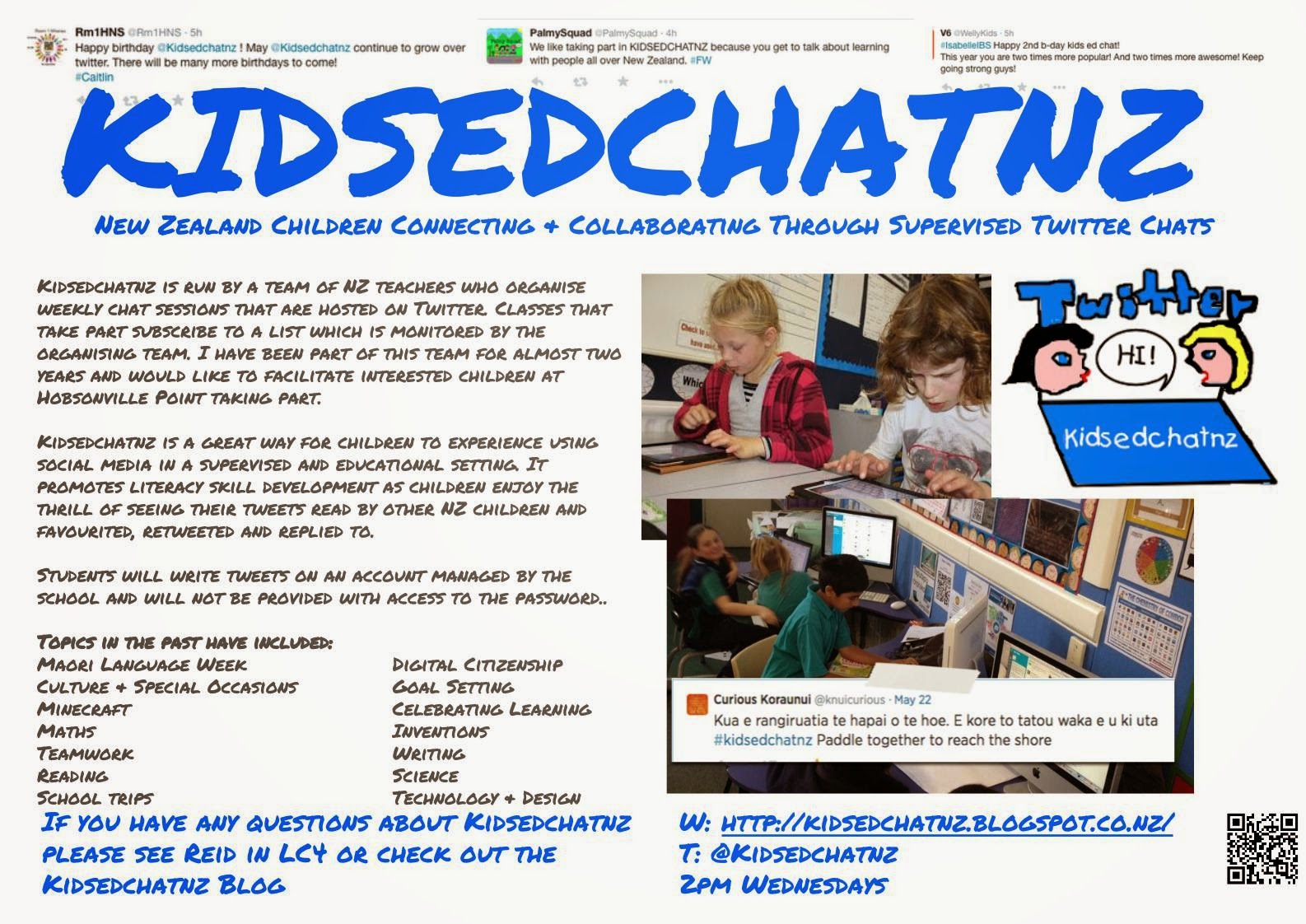
Once these components were all in place I pursued a path which is more akin to what I have done in other years. A couple of classes introducing Twitter, tweeting & Kidsedchatnz for those that are interested. When a Kidsedchatnz session is taking place I now try to ensure that the children are always in pairs so that no inappropriate tweets get through, this doesn't rule out poor spelling or off-topic tweets but that is largely a work-in-progress.

I always have the HPPS kids account on my Tweetdeck as a user column, this provides me with an ongoing record of what the kids are tweeting (as shown).

Some useful things to know if you are launching Twitter in your classroom:
It is possible to revoke permission to the Twitter App from the main Twitter website- a useful tool if you have loaded it onto multiple devices. Just go to Settings>Apps to revoke access.

You can schedule tweets through Tweetdeck, I've used this when moderating the chat sessions as it frees me of the need to post the questions and lets me concentrate on reading all the tweets.


I hope this is helpful for those investigating using Twitter in the classroom.

Any questions feel free to tweet, email or comment.


Tuesday, 8 July 2014

Twitter in @Rm1hns 2.0

Reading tweets the other day my interest was piqued by Craig Kemp's blog post on using Twitter in the classroom. I'm in my second year of using Twitter in class and swear by its effectiveness as an ICT tool but the scaffolding that Craig used as he introduced his class to Twitter weren't how I had attacked it's introduction. I was impressed by what Craig had done and it made me pause to consider the different introductions I'd used between the first & second years using the @rm1hns account with my year 5 & 6s. My comments here are based on what I did for my second year.

First tweet of the year:
I introduced Twitter on day 1 of the year.  Day 1 has so many requirements, I thought that giving the class a chance to "meet" their twitter account was a worthwhile interlude amongst some of the more mundane activities. The class account was put onto the bigscreen and we had a little chat about what they knew of Twitter. A handful of my class had been in @rm2hns so were well versed in Twitter but they were the minority. We talked about the Anatomy of a tweet and then I gave them a paper template to write their first tweet. The template was an excellent way to engage them in writing at the start of the year and knowing that your teacher only expects 140 characters has to be less of a shock than some first-up writing activities. After the usual writing process took place, children had included a twitter handle, experimented with hashtags and begun to grasp how much can be said in 140 characters.

I can't pretend that the first attempts were perfect tweets but some progressed to being tweeted while others remained in their paper form. All were displayed on the wall for the children to read. They needed to comprehend that once it was tweeted anyone could read it, an important digital safety lesson.

How we use Twitter:
We use Twitter regularly in the classroom. Any brainstorming or mindmapping session across a topic will often involve someone tweeting their ideas or questions. Microblogging what we're up to as a class and using twitter to share work with the teacher or others are both popular uses also. Recently, I connected with a colleague through twitter to have our students communicate around book discussions. This was massive for one of my students who is reading well above level and I need to keep engaged. But our most common use for twitter is Kidsedchatnz.

@rm1hnsis an enthusiastic member of Kidsedchatnz and I'm a coordinator of the programme but my experience with Kidsedchatnz and @rm1hns involvement was such that it could be somewhat confusing for the children due to its fast paced nature. Routinely over 500 tweets can be sent in the 45 - 50 minutes it operates. This is where Tweetdeck becomes almost a necessity to participate in a chat session.

Tweetdeck:
I experimented with using Tweetdeck with my class in our first year of twitter, the kids didn't like the column look and preferred to use Twitter's own platform to follow chats. This year, chat sessions have been even more fast-paced and occassionally difficult to follow. I introduced Tweetdeck by simply having my tweetdeck up on the smartboard, by demonstrating how much easier this makes it follow a chat session many of the kids were eager to give it a go. Tweetdeck is now installed on the desktops in Room 1 and the kids use a column to follow Kidsedchatnz. Because this app is always open, the spur of the moment tweet is easily sent also.

As the students have become better at following the chats and their general ability on Twitter, we've had the odd revision session. Sitting down looking at great tweets and breaking them down has been beneficial for my little tweeps. As year 5 & 6s I don't expect perfection but I do encourage them to always be lifting their standards of communication.

BYOD:
@rm1hns is a BYOD classroom. Many of the BYOD kids, after proving their responsibility, have installed Twitter on their devices and therefore are able to participate in Kidsedchatnz on their own. This allows our class to have up to 10 - 12 devices engaged in Kidsedchatnz. I watched a developing writer send his first tweet independently last Thursday on his own device, he was so proud it made me feel this is the right decision. The children are all happy to act as tweeters on behalf of others or the class as needs determine and several of them prefer to share their work via Twitter rather than emailing it.

I recognise that not all teachers would be comfortable having a class account loaded onto personal devices but I have my reasons. Firstly, I know that some of my students have created their own twitter accounts and I don't want to enable the use of these for class purposes, especially that occasionally there is contact between myself and @rm1hns. Because I know some have @rm1hns loaded on their devices I will intermittently send them a tweet promoting a free app, I wouldn't do this to their personal accounts.

The @rm1hns account is loaded onto all of my devices so I can easily check the activity but to this point it has never been an issue. Come the end of the year I will need to change the password and ensure the students remove it from their devices but that is not difficult.

Where to next:
I don't claim to have my students using Twitter perfectly, but I do know that as you introduce it into your class the second time you'll definitely do things differently. Craig's post made me reflect on how I'd changed the way I went about things in my second year of Twitter in the classroom. I'll be changing things next year too no doubt. I can see an earlier introduction to Tweetdeck, more emphasis on positive responses and a session where children can just have a chat session amongst themselves would be incredibly beneficial prior to taking part in Kidsedchatnz.

I haven't made the most of tools for curating social media, a couple of my students have been introduced to Storify. I would like to make more use of it as it has lots of creative uses in the classroom especially around the structure and sequencing of writing.

The use of Twitter is constantly involving and I loved the suggestion of a colleague recently about her students creating a book club using twitter. Maybe that book club is in my students future also...