Showing posts with label Twitter. Show all posts

Thursday, 30 April 2015

Tweeting in LC4

I've been using twitter in the classroom for some time now but am constantly picking up new ways to do things, naturally we're all learning but its the launch of Twitter into the classroom that I'm specifically referring to.

Going into HPPS I was wanting to use Twitter again but was conscious that I'd need to focus my attention elsewhere first and that there would undoubtedly be differences in the approach to what I used at my previous school (blogged here). Some differences featured primarily because of the use of Kidsedchatnz and others more for the use of Twitter generally.

Here are some things we did launching Twitter in LC4 and HPPS more widely:

The launch of a laminated Tweet board for every student in LC4. There are plenty of examples on the Internet but our example allowed for students to draw their own avatar, username and the box at the bottom allows for students to retweet or favourite their peer's tweets on the wall. This is all with the purpose of creating familiarity with the medium.

When an account was established for the school it was decided that the username should be generic for the school. This would allow for minimal clutter/confusion of accounts and that I could manage this account, the school retains control through a collating usernames, passwords and security questions for all social media accounts. For the record, along with other coordinators at Kidsedchatnz we believe that all class twitter accounts should include the username for the teacher in control of the account. This means should a dodgy tweet be sent it is easy to connect with the teacher who deserves to know what their kids have done, when moderating chats with children this provides an extra layer of support that is quite helpful.

Discussion about the use of social media with my co-teacher Amy and our principal signalled that clear communication with our school community would need to take place. This was a marked difference to my previous school but in hindsight is valuable and I would recommend this regardless of school practice. I sent permission forms home outlining the purpose of Kidsedchatnz specifically, as well as placing a poster about Kidsedchatnz on the walls of both LC3 & 4 for our school community to read.
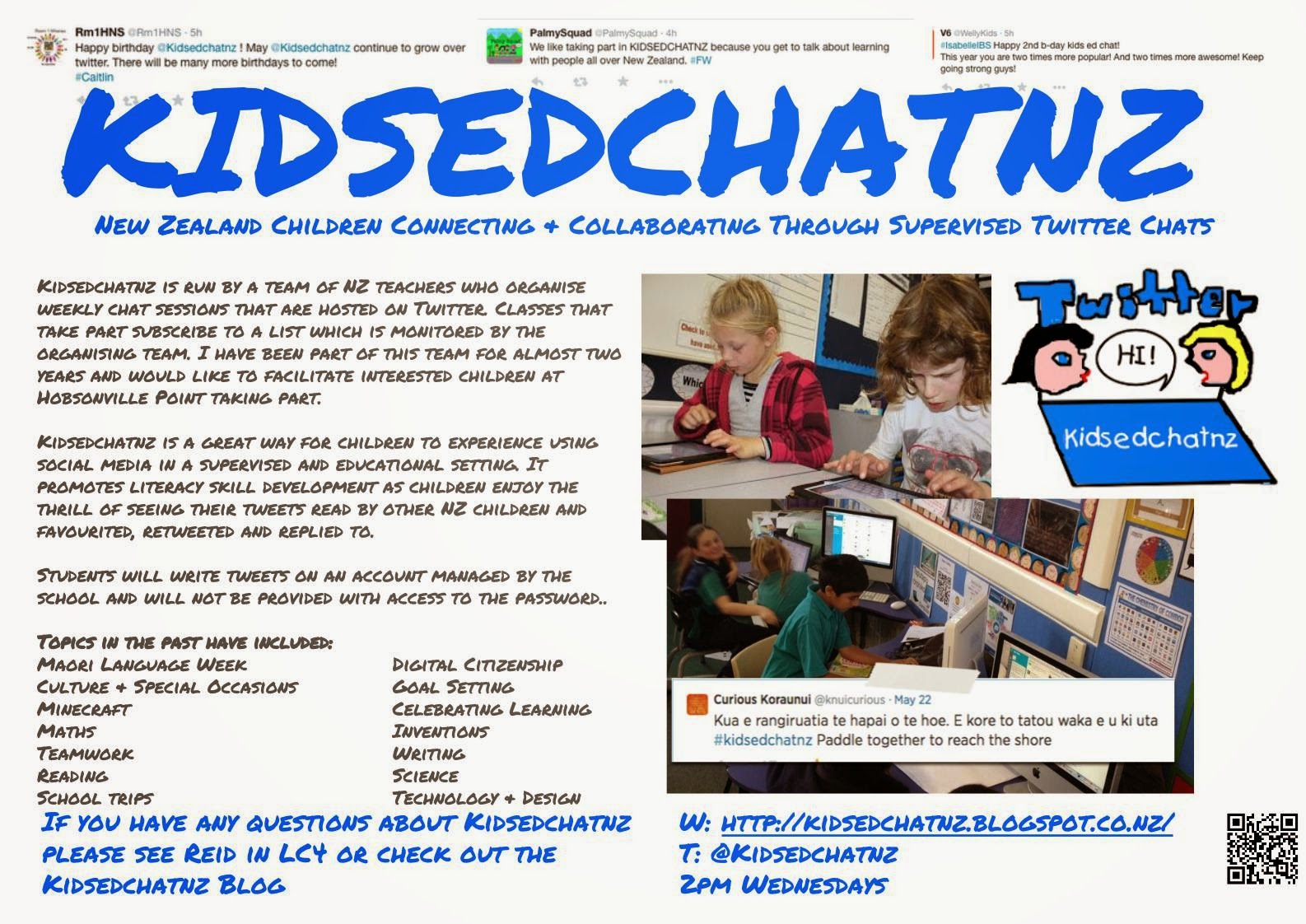
Once these components were all in place I pursued a path which is more akin to what I have done in other years. A couple of classes introducing Twitter, tweeting & Kidsedchatnz for those that are interested. When a Kidsedchatnz session is taking place I now try to ensure that the children are always in pairs so that no inappropriate tweets get through, this doesn't rule out poor spelling or off-topic tweets but that is largely a work-in-progress.

I always have the HPPS kids account on my Tweetdeck as a user column, this provides me with an ongoing record of what the kids are tweeting (as shown).

Some useful things to know if you are launching Twitter in your classroom:
It is possible to revoke permission to the Twitter App from the main Twitter website- a useful tool if you have loaded it onto multiple devices. Just go to Settings>Apps to revoke access.

You can schedule tweets through Tweetdeck, I've used this when moderating the chat sessions as it frees me of the need to post the questions and lets me concentrate on reading all the tweets.


I hope this is helpful for those investigating using Twitter in the classroom.

Any questions feel free to tweet, email or comment.


Thursday, 6 November 2014

Rethinking a Twitter disaster

Picture a classroom with 14-15 devices with children busy taking part in a chat session with over 1200 tweets and 25 classes participating. Add to it their classroom teacher who is moderating the session, its the last 10-15 minutes of the day so the class is starting to pack up and those who have been in another part of the school are filtering in excitedly. Sounds like chaos! This is the situation I found myself in last Thursday as my colleague entered the room to expose a "F-bomb" that had just been launched by my class in the chat session. I scrolled to the top and there it was for all to see, lobbed casually into cyberspace with no other tweet content so the intent and meaning of the message were in plain sight.

With devices shut down and class packed I let my them know I was disappointed and angry. They left school knowing they weren't to bring devices the following day as a trust issue had arisen. I had quickly been able to rule out several kids based on duties or responsibilities that had them out of the classroom, but this still left a large pool of students.

After school I spoke with my colleague, our IT support and the DP. Removing devices, a renewed focus on digital safety and mention of hunting for the IP address would all be used to attempt to find the culprit. The kids had been in peers, there was hope that 1 would come forward. Talking with Stephen Baker, another Kidsedchatnz coordinator, he supported the tactics but didn't envy the position.

The next day, they were asked to write apology letters and discuss digital safety. No further progress was made as to a culprit. It's fair to say that I was bitterly disappointed for both Kidsedchatnz, the classes exposed to this, the innocent parties in the room and our school. We had misrepresented our class, school and enthusiasm for BYOD and eLearning.

That weekend as I reflected I decided that I should apologise to them. I had partly contributed to this situation through trying to do too much. Over time we had been using more & more devices during a chat session. By having so many participating it made it more difficult to monitor what each group was doing, it only took 1 child to push the limits. A lot of thought perhaps over 1 word, a word that is all over our television screens, but our RTC require us to keep our students safe. I owed my students and others participating honest reflection of my own role in this.

Monday morning I spoke to the class about my role in this and apologised but stressed that I was still disappointed. We followed this up by investigating the power of the internet by focussing on what takes place in 1 minute and then sent out a simple message to investigate the reach of just 1 tweet. We have have discussed Digital Safety many times, but this lesson appeared to really resonate.

When the class had a look Tuesday afternoon, the potential viewers based on 21 Retweets was between 25 - 35,000 followers. They were blown away by the magnitude and 2 astute children likened the spread of a tweet to that of a virus.

Tuesday night I reflected on 2 days of device-free learning that had gone very well with plenty of engagement, choice, learning and student voice, I reached a shocking conclusion. I am convinced that I had moved away from effective use of the devices! However, the shift was so incremental that I hadn't noticed and it was only a complete removal of devices that highlighted this. This begs a question that I can not answer fully right now and brings me to the purpose of this post. What are the symptoms of ineffective use of technology that I should have noticed?

Clues that I have identified in my reflection:

  • A group of students that were seeking every opportunity to complete a learning task, but still not completing it.
  • Angst & disagreement between group members while completing tasks.
  • Tasks that were getting little to no feedback/forward or teacher support.
  • The tweet & inappropriate language suggests that they weren't being supervised or that I ought to have paired the students more effectively.
When recorded like this above, it would seem blindingly obvious, but each & every incident has taken place over several weeks and I have treated any issues on their face value rather than looking at any overall trends.

There is plenty of material discussing the point that eLearning should have the "e" removed, it is still effective pedagogy that drives the use of technology. I'm not a 'tool driven' user of technology and have experienced much success with technology so I am a little frustrated by this realisation. I'd appreciate some feedback on other indicators of ineffective use of technology, especially anything going beyond the 'why' a certain tool is being used.

Tuesday, 8 July 2014

Twitter in @Rm1hns 2.0

Reading tweets the other day my interest was piqued by Craig Kemp's blog post on using Twitter in the classroom. I'm in my second year of using Twitter in class and swear by its effectiveness as an ICT tool but the scaffolding that Craig used as he introduced his class to Twitter weren't how I had attacked it's introduction. I was impressed by what Craig had done and it made me pause to consider the different introductions I'd used between the first & second years using the @rm1hns account with my year 5 & 6s. My comments here are based on what I did for my second year.

First tweet of the year:
I introduced Twitter on day 1 of the year.  Day 1 has so many requirements, I thought that giving the class a chance to "meet" their twitter account was a worthwhile interlude amongst some of the more mundane activities. The class account was put onto the bigscreen and we had a little chat about what they knew of Twitter. A handful of my class had been in @rm2hns so were well versed in Twitter but they were the minority. We talked about the Anatomy of a tweet and then I gave them a paper template to write their first tweet. The template was an excellent way to engage them in writing at the start of the year and knowing that your teacher only expects 140 characters has to be less of a shock than some first-up writing activities. After the usual writing process took place, children had included a twitter handle, experimented with hashtags and begun to grasp how much can be said in 140 characters.

I can't pretend that the first attempts were perfect tweets but some progressed to being tweeted while others remained in their paper form. All were displayed on the wall for the children to read. They needed to comprehend that once it was tweeted anyone could read it, an important digital safety lesson.

How we use Twitter:
We use Twitter regularly in the classroom. Any brainstorming or mindmapping session across a topic will often involve someone tweeting their ideas or questions. Microblogging what we're up to as a class and using twitter to share work with the teacher or others are both popular uses also. Recently, I connected with a colleague through twitter to have our students communicate around book discussions. This was massive for one of my students who is reading well above level and I need to keep engaged. But our most common use for twitter is Kidsedchatnz.

@rm1hnsis an enthusiastic member of Kidsedchatnz and I'm a coordinator of the programme but my experience with Kidsedchatnz and @rm1hns involvement was such that it could be somewhat confusing for the children due to its fast paced nature. Routinely over 500 tweets can be sent in the 45 - 50 minutes it operates. This is where Tweetdeck becomes almost a necessity to participate in a chat session.

Tweetdeck:
I experimented with using Tweetdeck with my class in our first year of twitter, the kids didn't like the column look and preferred to use Twitter's own platform to follow chats. This year, chat sessions have been even more fast-paced and occassionally difficult to follow. I introduced Tweetdeck by simply having my tweetdeck up on the smartboard, by demonstrating how much easier this makes it follow a chat session many of the kids were eager to give it a go. Tweetdeck is now installed on the desktops in Room 1 and the kids use a column to follow Kidsedchatnz. Because this app is always open, the spur of the moment tweet is easily sent also.

As the students have become better at following the chats and their general ability on Twitter, we've had the odd revision session. Sitting down looking at great tweets and breaking them down has been beneficial for my little tweeps. As year 5 & 6s I don't expect perfection but I do encourage them to always be lifting their standards of communication.

BYOD:
@rm1hns is a BYOD classroom. Many of the BYOD kids, after proving their responsibility, have installed Twitter on their devices and therefore are able to participate in Kidsedchatnz on their own. This allows our class to have up to 10 - 12 devices engaged in Kidsedchatnz. I watched a developing writer send his first tweet independently last Thursday on his own device, he was so proud it made me feel this is the right decision. The children are all happy to act as tweeters on behalf of others or the class as needs determine and several of them prefer to share their work via Twitter rather than emailing it.

I recognise that not all teachers would be comfortable having a class account loaded onto personal devices but I have my reasons. Firstly, I know that some of my students have created their own twitter accounts and I don't want to enable the use of these for class purposes, especially that occasionally there is contact between myself and @rm1hns. Because I know some have @rm1hns loaded on their devices I will intermittently send them a tweet promoting a free app, I wouldn't do this to their personal accounts.

The @rm1hns account is loaded onto all of my devices so I can easily check the activity but to this point it has never been an issue. Come the end of the year I will need to change the password and ensure the students remove it from their devices but that is not difficult.

Where to next:
I don't claim to have my students using Twitter perfectly, but I do know that as you introduce it into your class the second time you'll definitely do things differently. Craig's post made me reflect on how I'd changed the way I went about things in my second year of Twitter in the classroom. I'll be changing things next year too no doubt. I can see an earlier introduction to Tweetdeck, more emphasis on positive responses and a session where children can just have a chat session amongst themselves would be incredibly beneficial prior to taking part in Kidsedchatnz.

I haven't made the most of tools for curating social media, a couple of my students have been introduced to Storify. I would like to make more use of it as it has lots of creative uses in the classroom especially around the structure and sequencing of writing.

The use of Twitter is constantly involving and I loved the suggestion of a colleague recently about her students creating a book club using twitter. Maybe that book club is in my students future also...

Tuesday, 18 March 2014

WAPA2020 Presentation

Today I presented at a WAPA2020 function. The topic of today's session was engagement and I presented on the use of Twitter and Blogging in the classroom. I made special mention of Storify, Thinglink and my beloved Kidsedchatnz. This is the slideshow I used and below that is the Thinglink image that I showed but in it's interactive form. If you have any questions please don't hesitate to tweet, comment on the blog or send me an email. I do respond.

The links will not work on the slideshare so here they all are:
Blogging in the classroom

Quadblogging International

Quadblogging Aotearoa

Storify - for curating social media

Thinglink - for creating images with rich embedded text.

Wednesday, 20 November 2013

Writing inquiry - digital platforms

Scenario:
As the end of 2012 and my first year of teaching came to a close I was dissatisfied with my writing programme, I'd had some success but was faced with a lot of reluctant writers, a mixture of poor-great writing lessons and many more questions than answers. Compounding matters I'd attended a Learning Network PRT session about the use of ICT. Walking away from that session I believed that using Twitter, student/class blogs and other online tools may play a significant role in moving my writing programme forward.

My goals were as follows:
Provide an audience for my budding writers. (Twitter, blogging, quad blogging)
Engage the children through online learning tools or Apps. (Collaborative writing tasks, blogging, digital publishing).

As I write the class blog has currently generated almost 16,000 page views, hundreds of comments, countless posts and Quadblogging forms a regular part of our reading and writing programme. Meanwhile, several students have made pleasing progress with their own blogs. The class twitter account is constantly used, has over 100 followers and is a consistent attendee on Kidsedchatnz. But this is not the success I want to celebrate here, even if there is plenty of improvement to be made in the kids work or my writing programme.

By delving into the digital world headfirst there have been many benefits but these three are worth sharing:
  • A class blog and twitter feed can provide connection with the class when children are away, I love that some of my class will write posts just to stay in touch. 
  • As students have arrived or left room 1 the class blog and Twitter have provided a connection with previous schools and old friends. This helps with the settling in period and has also provided a sense of understanding amongst the students as they get to know each other. New students may class blog and twitter feed can provide connection with the class when children are away, I love that some of my class will write posts just to stay in touch. 
  • The online tools and apps have provided a way to manufacture children into leadership positions as they become class experts. It is easy to provide a website or tablet to a child so that they can be the first in the class to experience a tool. This puts them in a role they may not normally experience helping some of my children to build their confidence and has added to their motivation in class.
  • I had hoped that the blog may also assist in promoting Te Reo. Our school has employed a Te Reo specialist but I wanted my students to receive more than this, especially my Maori children and hoped that they may use the blog and even twitter to communicate in Te Reo. When I first suggested this I was given a half hearted reply. But in the last few days two student blogs have started and they both want to promote their Te Reo Tajae's blog Pare's blog Their blogs even have the ability to complement teacher resources, as they are intent on promoting their language in ways that are authentic and therefore real to other students.
  • Blogging and Twitter have both provided a constant supply of examples where my class are meeting the Key Competencies. They need to: work hard to communicate meaningfully with other people; manage themselves and their blog efficiently and effectively; use language, text & symbols; many have chosen participate and contribute by promoting their own cultures and interests to other people.
Many of my HNS colleagues are intrigued by blogging and twitter, hopefully this might inspire a few to make the calculated shift into blogging, twitter and other online learning platforms.


Friday, 1 November 2013

Twitter, PD and Kidsedchatnz

Lots of people have advocated for the use of Twitter in education, here is another piece and it is well worth noting the great supporting article for Kidsedchatnz.

Education review article

Wednesday, 25 September 2013

Adventure learning - 1st attempt

This term I introduced my class to Adventure Learning. Our school was going to have our senior show and I knew my students would need a project to keep them on task while they were being pulled this way and that for their many commitments.

I had several great people to discuss my plans with, including both in-school support and some Tweeps (thanks especially to @simone015). But there were still mistakes to be made, lessons to learn and reflections to be had.

Last week our school presented the show and this week several students have presented their topics to the class. I'm certainly not going to have a 100% completion rate, I didn't expect to however I would have liked to see more projects being finished and shared with the class. Part of this bound to be my input, some kids deserved more scaffolding with self directed learning. They would have been better working in small groups with some hand-holding from their teacher, I was confident that they would get there but its been difficult trying to balance a severely constrained timetable, letting them explore their passion and trying not to take over (especially with some projects which were uber-cool!). 

  • Next time: a mix of individual, pair & group projects is required to balance interests & learning needs.
Expectations of quality are difficult to moderate. I've been pleased with what I have seen but thought I might have my socks blown off, this hasn't happened. However, the class is on their 1st attempt at such a project and I haven't modelled an Adventure Learning project to them. Success is hard to measure when you have no experience with this type of project.

  • Next time: I'm doing an Adventure Learning project too, maybe I'll even include some students with higher learning needs.

A handful of kids have moved swiftly to beginning another Adventure Learning project. Clearly they have become motivated learners, or at least found a suitable outlet for their motivations. The computer time before school has been graduated from games and blogging, to blogging and adventure learning. These two developments are both positive but I now need to integrate this energy across our timetable.

  • Next term: I need to provide opportunities for children to pursue learning in their own interests in more curriculum areas (I guess I'm looking at personalising learning more successfully).
It has been a positive move for classroom management too, it hardly takes a rocket scientist to understand that pursuing your own interests increases engagement and motivation. Some of my more difficult students have been more productive this term.

  • Next term: Can I continue this in other areas of curriculum?


I've loved the questioning, discussion and engagement that Adventure Learning has introduced to my classroom. I won't give it an A+ on its first attempt but do believe that it has demonstrated enough positives to warrant another attempt next term.

Now I just have to work out what my project will be for next term...

Thursday, 29 August 2013

Engagement, ICT & Social Media

One of my boys finds it difficult to write & read at National Standard level, I'm working my butt off to help him and its not for lack of motivation on his behalf. All year he has loved being able to interact with the ICT tools available to him, he'll tweet, blog & comment his way through a day. However, his work is generally facilitated by myself or  children in the class.

Today, he comes to me during Art (not his favourite subject at any time) and asked if he could go on the class blog to read, of course I allow him. Shortly after, he asks if he can show me something because he wants to do this for our class blog. I was looking at a St George School blog and a post announcing their Class Dojo points winner. We went into the Blogger dashboard to look at putting a Class Dojo icon & some text together to announce our points winner, but we didn't achieve the result either of us were after. So I suggested a Voki, the result below is pretty good.


I told him that he ought to tweet what he'd just done, he was quickly on the twitter account and contemplating what he'd do for a hashtag (i.e., planning - text features, audience, ideas). He quickly put together a tweet, asked me whether 'Just' was a j or g then spelled the rest and spelled fortnight without a second though. Now this isn't all his work, when writing 'voki' I told him to put the @ sign which of course gave us their @officialvoki handle, we did the same for @classdojo. "Can I copy the blog address?" and I'm beaming with pride. I gave him the hashtag but still...


Straight after lunch he asked if he could jump on Twitter again and sent a 2nd tweet without any help.

I accept these aren't full Level 3 texts, but walking is considered a safe way to learn to run. He's engaged, finding a way to communicate, interact and is having fun while he's at it.  The difficult part is moving him from here to somewhere nearer to where him Mum and I would love him to be. Clearly, using ICT is a large factor in this planning. I have a plan to use Storify to curate a text, we'll be able to work on sequencing, planning, & many other surface & deeper features.

I'm sharing because I have had a victory and I know that there will be many accidents in this learning journey but we're both having some fun on the way.

Interestingly, after lunch he gave me a note to say thank you, the writing & handwriting was all rather sketchy, demonstrating that for some the computer is a better tool for learning to write. Maybe he should have tweeted ;-)

Monday, 15 July 2013

Fantastic Flying Books of Mr Morris Lessmore

The final 2 weeks of term provided some great highlights. I had bought this book (pictured) at the end of last year and put it away for a rainy day but an idea shared through twitter got it off the shelf earlier - it has an App...


Last Friday, I read this to my class and was amazed with the level of engagement. We had predictions coming left, right & centre and they were commenting about all sorts of language & plot features. The book also contains some beautiful artwork, ranging from full colour to black & white and everything in between as the mood of the main character changes. The class had picked up on this and were getting very excited as they progressed through the book.

Once we'd finished they were uber-excited about doing some work to demonstrate their learning and this resulted in the creation of several posters including posters, a PicCollage, many pieces of writing. It was awesome to see the kids so engaged with a book but the best was yet to come...

On the last day of term I planned to show the class the Imag-N-O-tron App, we knew that it was an interactive version of the book but weren't prepared for the awesomeness that occurred. First, we visited the book's website where we saw a sample of the short movie the book inspired and then read the real book again using an iPad/projector combo to show the pages on the smart board. The App features Augmented Reality images that blew the classes mind, I'm not going to describe these images here except to say the class applauded the app at the end of the book! 

Next step is to find more books & apps of this quality for the class and I recommend that you get the app & book for yours

Thursday, 4 July 2013

Favourite web resources

I presented one of my favourite apps to the staff at Henderson North School last night, Pic Collage is a fabulous tool that can be used in many ways. The first thing I was asked afterwards was if it was available just on the internet. It's not but I thought I could share my favourite web resources.

Padlet (formally Wall Wisher)

A great resource for use in planning or creating information. I love the way that it has become a virtual noteboard for me which makes my planning easier. In the classroom we use it for all sorts of things.

Primarily used for the recording and sharing of music. However, we are using Soundcloud for all sorts of things including doing spelling tests, recording class discussions, speeches, songs. The class also uses this as a source for music when making movies.

Shock, horror! Like a lot of teachers I'm using this to find great videos for education purposes. As a video hosting site it serves a purpose, my class and I both have channels for videos we're creating. It's also a great tool for working out how to do things with your computer such as learning how to use other computer tools, if you have a question about how to do something someone has probably filmed it for YouTube. 

Google isn't just for web searching, maps and images. Google Drive provides a magnificent assortment of tools in the Google Drive. As a class it provides a great alternative for word processing because the kids can access their work at home once they login. But its the ability to collaborate in real time that is a great advantage, several kids working on one document/presentation/etc results in engaging writing lessons and cool projects.  My class love the Google Form option and even surveyed their parents about  our class at the latest Student-Led Conferences.

How do I know about all these resources, all the apps I use and lots of the ideas for my classroom? It's not about telling everyone you're having a coffee, its about sharing information and collecting information. My class uses it to talk with other classrooms around the country and are becoming more aware of the world around them because of Twitter. It also helps that it gives me a tool to then talk about digital safety or cybersafety (whatever handle you want to use).

Wednesday, 3 July 2013

Chicken or the egg?

I have a little tech guru in my class, he's been leading the way with individual blogs and is always there to answer questions or provide assistance when teachers and students have questions. He has also been eager to help others with movie making.  Late last week he came to me with this lightbulb:

He is a reluctant writer and I recognised a great opportunity to improve his literacy skills.

The journey began with a tweet to get some recommended resources and we searched online to see what was available.

This recommendation was spot on, Peter has been captivated since, is even earlier to school and has been proud of his achievements. I'm finding mini-lessons to improve his writing through his HTML journey and am learning a lot myself. I'm starting to form ideas around some  ideas to leverage this and can't wait to share them.

Personalisation is so much easier with devices and the proliferation of interactive web resources, I love using these resources for engaging reluctant learners and facilitating learning. I believe its a way to engage but I know others think its the reward for hard work.

So chicken or the egg?


Thursday, 13 June 2013

ICT in teacher training

I sat in two meetings yesterday where there were vastly different attitudes to Twitter. In one it was seen as a valued tool in the classroom that can advance learning, in the other there was a bit more dissonance. This divide is something I've been contemplating lately as I push my own learning via my online PLN, my classroom through various online platforms and my own PD.

My pre-service was completed at Auckland Uni on the 1 year course and I was surprised that ICT hardly featured, we had some exposure to Moodle and Eportfolios but neither with our own teaching in mind. Fortunately, I was lucky to have a placement in 1 school where ICT was pushed and saw the use of Scratch and GIMP in a Y5/6 class. But why do teacher trainees have to rely on luck? Clearly, time is a factor when selecting teaching material for pre-service and I value all of the information provided. However, I'm not convinced that it adequately prepares the new teacher for a world where many teacher vacancies include ICT in their requirements.

Fastforward to now (PRT 18 months in), I am using Twitter for all sorts of information sharing, blogging with my class and as a teacher, regularly use my iPhone as a tool with the kids and collaborate with teachers in other schools with enthusiasm. This week I have provided support to a teacher looking to get on Twitter (@htauahns), have been asked by my Mentor Teacher to help with his ICT development and had another experienced teacher quip that she'll give Twitter a go when she has plenty of time for learning. So I think the dissonance is receding, I just have to keep on tweeting!

But what about those in pre-service now? We have some student teachers at the moment, I've shared ideas with them and explained several tools including Popplet, Explain Everything and modelled creating a classroom expert. I'm feeling even more optimistic after seeing that Auckland Uni is making progress in the ICT area for teacher training also.

Tweeps communicate both during formal PD settings and informally with ideas, strategies, feedback and resources. With the enthusiasm that abounds on Twitter maybe ICT doesn't require focus in teacher training, but it sure would have made my time far more engaging!

Sunday, 26 May 2013

Clone me

As a beginning teacher I'm still developing all my systems, both for classroom management and for planning. This week I used a tool that is going to help with both.

Week 2 ended with Room 1 running the assembly for Henderson North School, the class thought it would be cool to use a Voki for some of the assembly, I agreed.  After the kids had set up the voki for assembly, a child suggested "Mr Walker, you could use that for giving us instruction" and so I was set onto my "Clone Me" journey. I knew this can be done with Voki but simply haven't used it.

Week 3 saw Room 1 scheduled for ICT week and I was planning on creating movies using iMovies and one of my boys would be a class expert to support the children while I was busy. However, I also wanted him to have a task he could sink his teeth into and do some learning also. I was interested in him doing some screencasting, he thought this was a great idea and found the Screencast.com would give us the tools. My PLN on Twitter allowed me to check this though and as usual I got great support. After a bit of a play, Snagit was the chosen platform.

I made a video over the weekend so that I could see how it works. The class blog now has a Snagit clip explaining how to comment on a post for the parents.

But the real test was for the children, would they respond to instructions using Snagit? My release day was on Wednesday, so l I scanned a language activity for use on the smart board, set it up and after a few takes (much to the amusement of those kids present) had a video already for later in the day. I was in the staffroom next door when my release teacher played the video and I could hear the response, I checked the class soon after. Most agreed this was a fun way to get instructions (even if I had missed something out).

I know how to clone myself, this is an important lesson for a BT, I have a tool that can create more 'time' for students and therefore learning. When my kids become more used to my SnagitMe I hope to create some videos that they can access themselves for mini lessons with ICT, writing, maths and reading. I just have to work out the best way for hosting them!